AI CRM Free Plans: Limits, Fees, Upgrade Points
Compare free AI CRM plans: seat and contact caps, AI availability, automation limits, and when costs rise.

Free AI CRMs are fine at the start, but most teams hit the paywall on seats, contacts, automation, or reporting.
If I cut this comparison down to one takeaway, it’s this: HubSpot gives the best free starting set, Zoho gives the most free seats, Capsule runs out of room first, and Freshsales works best if built-in calling and email matter more than AI. But across all four, the same pattern shows up fast: the AI most sales teams want is not in the free plan.
Before I pick a free CRM, I’d check four things first:
- User caps: HubSpot and Capsule stop at 2 users; Zoho and Freshsales go to 3
- Contact or record caps: Capsule is tightest at 250 contacts; Zoho allows about 5,000 records
- Automation: Free plans are very limited across the board
- Extra costs: branding, storage limits, call charges, onboarding fees, and AI add-ons can push costs up
If you want a simple rule: pick the CRM whose first limit you can live with the longest. For many small U.S. teams, that limit is not AI first. It’s usually seats, contacts, pipeline count, or reporting.
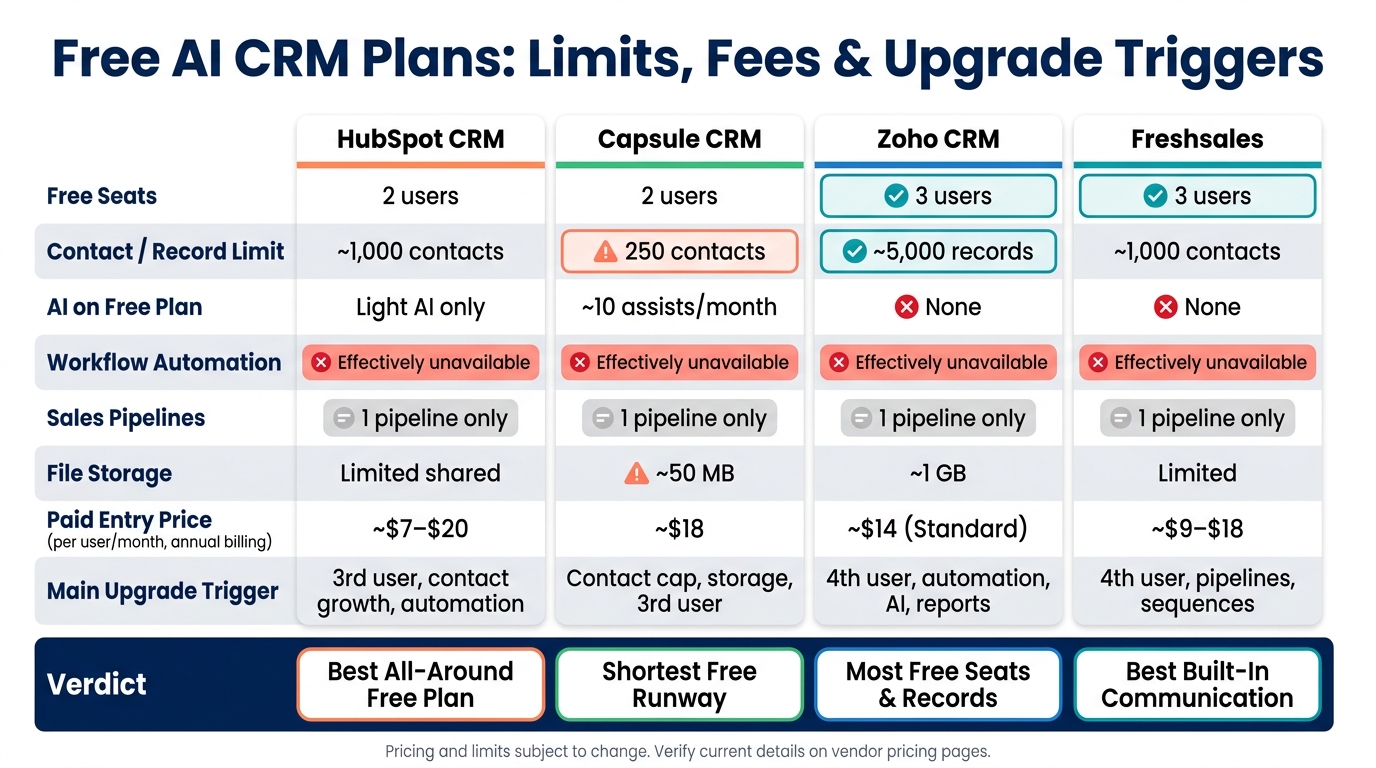
Free AI CRM Plans Compared: Limits, Costs & Upgrade Triggers
My TOP 5 CRM Software | Free vs Paid CRMs for Small Business
sbb-itb-fd683fe
Quick Comparison
| CRM | Free Seats | Free Contact/Record Limit | AI on Free Plan | Main Upgrade Trigger |
|---|---|---|---|---|
| HubSpot CRM | 2 | 1,000 contacts | Light AI only | 3rd user, more contacts, automation |
| Capsule CRM | 2 | 250 contacts | About 10 AI assists/month | Contact cap, storage, 3rd user |
| Zoho CRM | 3 | 5,000 records | No | 4th user, automation, AI, reports |
| Freshsales | 3 | Varies by source | No | 4th user, more pipelines, sequences |
A few cost points stand out right away:
- HubSpot: paid entry often starts around $7–$20/user/month billed annually, but higher plans may add onboarding fees
- Capsule: paid plans start around $18/user/month billed annually
- Zoho: Standard starts at $14/user/month billed annually, but AI sits much higher
- Freshsales: paid plans often start around $9–$18/user/month, with extra call costs and possible AI add-ons
So if I were choosing fast:
- Pick HubSpot if I want the best free all-around setup for a tiny team
- Pick Zoho if I need 3 free users and can live without AI
- Pick Capsule if I have a very small contact list and want plain setup
- Pick Freshsales if phone and email tools matter more than reporting or AI
That’s the full story in short: free CRM plans are good for starting, not for staying.
1. HubSpot CRM
Contacts & Pipelines
For new free accounts created around September 2024 and later, HubSpot usually caps usage at 1,000 contacts, 2 users, 1 deal pipeline, and about 10 custom properties per object.
In plain English, that setup works for a small two-person sales team: often a founder and one rep working from the same pipeline. It can feel fine at first. Then the pressure starts to show in three places: user count, contact growth, and automation.
HubSpot also splits contacts into marketing contacts and non-marketing contacts. That matters more than many teams expect. You can store a larger contact history inside the CRM, but only marketing contacts count toward active outreach. On the free plan, you get 2,000 marketing emails per month. And once your active marketing-contact group goes past 1,000, most teams end up either cleaning the list hard or moving to a paid plan.
AI & Reporting Limits
The free plan includes limited AI. You may see simple email writing help or light data-enrichment prompts, but the heavier AI tools stay behind paid tiers. That includes things like predictive lead scoring, email-sequence tuning, and AI-based automation, which are usually locked to Starter or above.
Reporting follows the same pattern. Free users get the basics: standard dashboards, deal counts, and activity views. But if your team wants custom attribution, multi-touch funnel reporting, or cohort analysis, those features aren't part of the free setup.
That gap becomes a problem once the CRM needs to do more than just hold contact records. At that stage, teams often want answers, not just data.
Integrations & Storage
HubSpot's free plan does cover some useful day-to-day tools. You can connect Gmail or Outlook, book meetings, and use basic app connections. For a small team, that's often enough to get moving without much friction.
The ceiling shows up when the process gets more involved. If you need multi-step workflows, deeper sync rules, or tools like invoicing and support systems sending data back into the CRM, you'll usually need paid Operations Hub features or a higher-tier plan.
Storage itself is not the first thing that breaks. HubSpot supports up to 1 million records across standard objects. So the issue usually isn't raw record capacity. It's that long before you hit that number, the free plan starts to feel too tight for a growing sales operation.
Upgrade Triggers & Fees
The most common reasons teams upgrade are pretty simple:
- Adding a third user
- Going past 1,000 contacts
- Needing multi-step automation
A two-person team can often stay at $0/month for a while. But once a third rep joins, costs can move into roughly $21 to $60/month, based on Starter pricing of about $7 to $20 per user per month when billed annually.
There's also the branding issue. On the free plan, HubSpot adds its branding to emails, landing pages, meeting links, and chat widgets. For some teams, that's fine. For others, it starts to look a bit like wearing someone else's logo to your own meeting.
One more budget detail matters here: Professional and Enterprise plans can come with mandatory onboarding fees. If you're pricing HubSpot only from the monthly subscription line, it's easy to miss part of the total cost.
2. Capsule CRM
Contacts & Pipelines
Capsule's free plan gives you 2 users, 250 contacts, 1 pipeline, 5 custom fields, and about 50 MB of storage per account.
That 250-contact limit is where things get tight first. In B2B, a person and their company can each count as separate records, so you can burn through that cap faster than you'd think. A solo consultant or freelancer with a small set of active leads will probably be fine. But once a founder starts doing outbound, that limit can show up in a hurry.
And that’s just one part of it. The bigger drop-off tends to hit when you look at AI and reporting.
AI & Reporting Limits
The free plan includes about 10 AI assists per month. That’s enough for a few outreach drafts or follow-up emails without spending anything. But more advanced AI features like pipeline generators, AI summaries, and enrichment features sit behind paid plans.
Reporting is also pretty narrow. On the free tier, you’re limited to records and pipeline stages, while dashboards and sales analytics are paid-only. So yes, you can track the basics. But if you want a clearer view of what’s working and what’s stuck, you’ll hit the wall fast.
Integrations & Storage
The free plan works with Gmail and Microsoft Outlook. You also get tasks, calendar tools, and mobile apps. That covers the day-to-day basics for a small team.
Storage is another pinch point. About 50 MB per account disappears fast once people start attaching files. And if you need deeper connections with marketing or accounting tools, those are held for paid tiers.
Upgrade Triggers & Fees
A third user, a bigger lead list, or regular file uploads usually pushes teams to the Starter plan, which costs about $21 per user per month on monthly billing, or $18 per user per month when billed annually.
For three users, that comes to about $54 per month on annual pricing. In return, contact limits jump to 30,000 to 50,000, and storage increases to 5 GB per user.
The free plan also leaves out workflow automation and email templates, which means lead assignment and follow-up stay manual once the team starts to grow.
3. Zoho CRM
Contacts & Pipelines
Zoho gives you more free seats than most tools in this group, which sounds great at first. The catch is that AI stays off the table.
Zoho CRM's free edition supports up to 3 users and about 5,000 total records across leads, contacts, accounts, and deals. The moment a fourth user needs access, the team has to move to a paid plan.
On the free plan, you can work with leads, contacts, accounts, deals, tasks, calls, notes, and the mobile app. So yes, it covers the basics for a small team that just needs a place to log activity and move deals forward.
AI & Reporting Limits
This is where Zoho draws a hard line. The free plan has no AI at all. Zia isn't included, and it also stays out of reach on most lower-tier plans. Features like predictive lead scoring, AI-assisted follow-up suggestions, and shortcut suggestions only appear on the Enterprise and Ultimate tiers.
That means the free version works for tracking what happened. It doesn't do much to help you decide what to do next.
Reporting is also pretty limited. Custom dashboards, advanced analytics, and forecasting all sit behind paid plans. If you want to measure rep performance or see where deals stall in the pipeline, you'll run into that limit fast.
Integrations & Storage
The same story shows up with integrations and storage: enough to get started, not much room to grow.
The free plan includes about 5,000 API credits per 24 hours. Free users can send up to 150 emails per day. They also get 10 custom email templates and 10 data exports. Shared storage is about 1 GB, which can disappear pretty fast once files and attachments start piling up.
Workflow automation is tight. Sources vary, with some saying the free plan allows as few as one active workflow rule, while Zoho's own free-edition comparison notes up to five. Either way, the point is the same: there's very little space for automation.
Upgrade Triggers & Fees
Most teams outgrow the free plan for a few plain reasons:
- They hit the 3-user limit
- They run out of record space or storage
- They need workflow automation
- They want better reporting
AI is another big one. It's not part of the free plan, and it only starts to make sense at the Enterprise or Ultimate level.
| Plan | Annual Price (per user/month) | Monthly Price (per user/month) |
|---|---|---|
| Standard | $14 | $20 |
| Professional | $23 | $35 |
| Enterprise | $40 | $50 |
| Ultimate | $52 | $65 |
For a 3-person team moving to Standard, the cost is $42/month billed annually. If the team wants AI, though, they're looking at Enterprise or Ultimate, which is a much steeper jump in cost.
4. Freshsales
Contacts & Pipelines
Freshsales gives you a free version of its core CRM, but many of the tools teams usually want end up in paid plans pretty fast. The free plan is geared to very small teams, with up to 3 users and just one pipeline.
There’s also some mixed information around contact limits. Some sources say the free plan supports about 1,000 contacts, while others say there isn’t a hard cap. So if you’re planning around volume, it’s worth double-checking before you commit.
For a founder or a couple of reps, the free plan can do the job. You get contacts, accounts, deals, email, tasks, notes, and mobile access. But once the team starts growing, the cracks show.
AI & Reporting Limits
This is where Freshsales starts to feel more locked down. Freddy AI isn’t included in the free plan. Features like deal scoring, contact scoring, email drafting, next-best-action suggestions, and forecasting are reserved for Pro or Enterprise. In some cases, you may also need a separate add-on, such as Freddy Copilot at roughly $29 per agent per month.
Reporting is also thin on the free tier. You get little to no reporting, and there are no custom dashboards or funnel analytics.
That matters once a team wants more than a basic contact database. If you need the CRM to help spot patterns, track pipeline health, or guide reps on what to do next, the free version runs out of road fast.
Integrations & Storage
Freshsales does cover basic email sync and a few native Freshworks connections, which is fine if your setup is simple. But workflow integrations depend on automation, and the free plan doesn’t include that.
Storage and advanced document management also sit behind paid plans. So if your team needs data to move on its own between CRM, marketing, support, and billing tools, the free plan can feel pretty limited.
There’s also a cost detail that’s easy to miss: the built-in phone module is included, but call minutes cost extra. If your reps spend a lot of time making outbound calls, that line item can grow fast.
Upgrade Triggers & Fees
Most teams hit the upgrade point for pretty basic reasons. The free plan stops fitting when you need a fourth user, a second pipeline, or sales sequences. And sequences don’t show up until Pro.
Paid plans start at around $9–$18 per user per month with annual billing. On paper, that may seem fairly low. But once AI tools and other add-ons enter the picture, the monthly bill can climb faster than you’d expect.
Note: Freshsales' free availability varies by source; verify the live pricing page before relying on it.
Limits, Hidden Fees, and Upgrade Pressure Points
Free CRM plans usually help you get started. They don't do much for growth.
That pattern shows up across all four CRMs here: you get basic access up front, then run into limits once your team starts using the tool every day.
Contacts, Users, and Pipeline Limits
The simplest way to compare these plans is to look at the limits that tend to break first.
| Feature | HubSpot CRM | Capsule CRM | Zoho CRM | Freshsales |
|---|---|---|---|---|
| Contact/Record Limit | About 1,000 contacts | 250 contacts | About 5,000 records | About 1,000 contacts |
| User Seats | 2 users | 2 users | 3 users | 3 users |
| Sales Pipelines | 1 pipeline | 1 pipeline | 1 pipeline | 1 pipeline |
Capsule is the most restrictive on contacts. Zoho gives you the most room on seats and records. But all four hit the same wall on pipelines: you only get one.
That matters more than it may seem at first. One pipeline might work for a tiny sales team. But if you want to split inbound leads, renewals, partnerships, or account-based sales into separate flows, the free plan starts to feel cramped pretty fast.
AI Features and Reporting Limits
This is where the free plans split apart the most.
In practice, free tiers almost never give you AI tools that do much. Predictive scoring, assistants, and deeper sales guidance are usually kept for paid plans.
| Feature | HubSpot CRM | Capsule CRM | Zoho CRM | Freshsales |
|---|---|---|---|---|
| AI Assistant | Very limited or unavailable | Not available on free tier | Not available on free tier | Not available on free tier |
| Lead Scoring | Manual only | Not available | Not available | Not available |
| Reporting Depth | Limited dashboards and reports | Basic reporting | Standard reports | Basic dashboards |
| Custom Reports | Locked | Locked | Locked | Locked |
The free tier is mostly for basic tracking. Zoho's Zia and Freshsales' Freddy AI are both behind paid plans, so any free AI access is mostly surface-level, while the tools people tend to want are reserved for paying customers.
The pressure to upgrade usually starts when your team wants things like:
- Custom reports
- Forecasting
- Funnel conversion analysis
- Rep-level performance tracking
That's the point where "free" stops feeling free and starts feeling like a demo.
Integrations, Automation, and Storage Limits
Automation is another common stopping point.
A free plan may connect with a few apps, but workflow rules, sequences, API access, and webhook-style connections are usually not included.
| Feature | HubSpot CRM | Capsule CRM | Zoho CRM | Freshsales |
|---|---|---|---|---|
| Workflow Automation | Effectively unavailable | Effectively unavailable | Effectively unavailable | Effectively unavailable |
| Native Integrations | Limited app access | Limited | Mainly Zoho apps | Basic native connections |
| File Storage | Limited shared storage | About 50 MB | About 1 GB | Limited storage |
The bigger issue is often API access, not just the number of apps on the list. Zoho's free edition is especially narrow outside the Zoho stack, and Capsule's 50 MB storage cap can disappear fast if you're saving contracts, PDFs, or screenshots in the CRM.
Common Upgrade Triggers and Added Costs
Once these limits start slowing down day-to-day work, price becomes the next issue.
Most teams move up when they need a fourth user, a second pipeline, automated follow-up, or stronger reporting. Those aren't edge cases. They're normal growth moments: hiring reps, adding files, or increasing marketing contact volume.
| Upgrade Trigger | HubSpot CRM | Capsule CRM | Zoho CRM | Freshsales |
|---|---|---|---|---|
| Typical First Paid Tier | About $15–$20/user/month | About $18–$25/user/month | About $14/user/month | About $9–$15/user/month |
| Automation Access | Starter or higher | Starter or higher | Standard or higher | Growth or higher |
| AI Features | Paid tier required | Paid tier required | Paid tier required | Paid tier required |
| Common Hidden Cost | Marketing contact overages | Extra seats or storage | Extra seats, storage, or add-ons | Email, telephony, or storage expansion |
HubSpot's marketing costs can climb fast as active contacts increase.
Note: Pricing varies by billing cycle, and monthly pricing is usually higher than annual billing. Always verify current rates on the vendor's pricing page.
Pros and Cons
Each free plan fits a different point in a company’s growth. The table below shows which one gives you the most breathing room before upgrade pressure kicks in.
| CRM | Pros | Cons |
|---|---|---|
| HubSpot CRM | Best all-around free CRM, but it gets tight fast on seats, contacts, and AI use. | Seats, contacts, and pipelines hit their cap fast; AI and automation sit behind paid tiers. |
| Capsule CRM | Best for very small teams; simple setup, but tight contact and storage limits. | 250 contacts and 50 MB storage; no automation; very limited AI. |
| Zoho CRM | Best free seat count, but light on AI and reporting. | No AI guidance or prioritization; limited automation and customization. |
| Freshsales | Best built-in communication stack, but light on AI and automation. | No AI, no sequences, no automation, no custom dashboards on the free plan. |
After that, the real question is simple: which limit breaks first - seats, contacts, AI, or reporting?
HubSpot CRM Pros and Cons
HubSpot is the strongest all-around pick, but its free plan gives you a lot up front and then tightens the screws pretty fast. You get a usable CRM, but the limits show up early. The free tier is capped on seats, contacts, and pipelines.
That matters sooner than you might expect. Need a third user? Want a second pipeline? Need to remove HubSpot branding from emails? That’s where the free version starts to feel small. AI can also bring credit-based charges on top of seat pricing, which adds another limit to watch.
Capsule CRM Pros and Cons
Capsule works best for a very small team that just needs one place to track contacts and deals. It’s simple, and that simplicity can be a plus at the start.
The catch is that the ceiling is low. Storage is capped at 50 MB, which is a problem for file-heavy workflows, and the 250-contact limit means many active teams outgrow it fast. There’s no automation, AI help is minimal, and some integrations - including QuickBooks and Xero - are locked behind a paid plan.
Zoho CRM Pros and Cons
Zoho stands out for one reason right away: it gives you the most free seats. For teams with up to 3 users, that can make it an easy starting point.
But there’s a trade-off. Zia isn’t included, which means no AI-based guidance, no lead prioritization, and no next-step suggestions anywhere in the free plan. Reporting is basic and not customizable, storage is limited to about 1 GB, and data exports cost extra. So yes, it’s a CRM at $0 - but not one that helps much with AI-led sales work.
Freshsales Pros and Cons
Freshsales makes the most sense when communication matters more than AI. Its built-in phone, email, and chat tools help cut down on tool sprawl, which can make day-to-day work a lot cleaner.
Still, the free plan leaves out a lot. There’s no AI, no automation, no sequences, and no custom dashboards. That means the plan starts to run out of room the moment a team needs repeatable follow-up. Once automation or forecasting becomes part of the job, the free tier is already too small.
Conclusion
The right free CRM isn't the one with the biggest feature list. It's the one that keeps working the longest for your team's size, lead volume, and day-to-day workflow. Put simply, the main question is this: which free plan breaks down first for your team?
In practice, HubSpot is the strongest all-around starting point, but its limits on seats, contacts, and pipelines can show up fast. Capsule gives you the shortest free runway. Zoho offers the most room on the free plan, though many teams move up for AI, automation, and richer reporting instead of storage. Freshsales stands out early on for built-in phone, email, and chat more than AI.
Across all four tools, the pressure to upgrade tends to come from the same places: automation, deeper reporting, and AI. Free plans usually hold up until a team needs workflow automation, better reporting, or more serious AI support. That's also the point where paid tiers and add-on costs can climb fast.
Choose the CRM whose first limit you can live with the longest.
FAQs
When should I upgrade from a free AI CRM?
Upgrade when your business starts to hit the free plan’s limits.
For example, that usually happens when you need more than two users, deeper contact enrichment, or branded meeting links.
It also makes sense to move up when those caps start getting in the way of day-to-day work. If your team needs automation, conversation routing, multi-user roles, deeper integrations, or compliance needs like HIPAA or SOC 2, the free plan often stops being enough.
Which free CRM limit hits first?
In most cases, user seats or feature caps are what teams run into first. A lot of free plans stop at two or three seats, which becomes a problem fast once more people need access.
Other limits tend to show up right after that. Things like pipelines, monthly calling minutes, and automation quotas can push teams to upgrade once day-to-day use moves past the basics.
What hidden costs should I watch for?
Look past the free plan’s sticker price. The base tier may look cheap, but the extra charges can add up fast.
Common hidden costs include mandatory onboarding fees of $1,500–$7,000, plus annual support packages that often run 15%–30% of license fees. On top of that, some platforms charge overages for API calls, data storage, or marketing contact limits.
You might also end up paying more for things like:
- Premium connectors
- Advanced AI tokens
- Third-party integrations like Zapier
- Added admin support
That last one catches a lot of teams off guard. If you need dedicated CRM staff or help from implementation partners, rates often land between $125 and $250 per hour.
Related Blog Posts
- 10 Best Sales Pipeline Tools 2026
- Hidden Costs of Enterprise CRM Solutions
- 10 Best Free Task Management Tools 2026
- Hidden Costs of AI in SaaS Platforms
More on StackRundown
Continue on the CRM Software hub, or read next: