ERP Implementation Failures: Lessons From Case Studies
Compare ERP failures at Hershey, Lidl, Marin County, and Tennant. The pattern is timeline, data, testing, and ownership, not the software.


Most ERP failures are not software failures. They are project failures. If I had to boil this article down to one point, it would be this: teams get in trouble when they rush the timeline, overload scope, skip hard process decisions, move bad data, cut testing, and treat ERP like an IT install instead of a business change.
Here’s the short version:
- Hershey shows what can happen when a company rushes go-live and trims testing.
- Lidl shows the cost of forcing the system to copy old habits through heavy customization.
- Marin County shows how weak governance can stall a rollout.
- Tennant’s 2025 SAP cloud ERP cutover shows these problems still hit companies now, not just in old case studies.
A few numbers make the point fast:
- ERP failure rates are often estimated at 50% to 75%
- Tennant lost about $30 million in one quarter after its North America cutover
- Tennant’s stock fell 23.4% in one trading session
- Some recovery budgets are guessed too low by as much as 4x
- Hershey cut a 48-month plan down to 30 months
If I were taking the lesson into my own ERP project, I’d keep it simple:
- Set a timeline based on readiness, not pressure
- Limit scope at first and roll out in phases
- Clean data before migration
- Test full business flows, not just screens
- Train users by role before launch
- Keep executive ownership active from start to finish
ERP Implementations Failed Again in 2025 | Here's Why
sbb-itb-fd683fe
Quick Comparison
| Case | Main goal | What went wrong | Business lesson |
|---|---|---|---|
| Hershey | Replace old systems with SAP, SCM, and CRM | Compressed schedule, big-bang launch, weak testing window | Speed can break a rollout |
| Lidl | Standardize retail processes | Too much customization, poor fit with business model | Don’t force ERP to copy every old process |
| Marin County | Move off legacy systems | Governance gaps, weak control, project drag | Clear ownership matters |
| Tennant | Move to SAP cloud ERP in phases | North America cutover failed under heavier volume and more difficult workflows | One good phase does not prove the next phase is safe |
That’s the core takeaway: ERP projects fail in ways that are easy to spot early, but only if leaders deal with scope, data, testing, and ownership before go-live.
Common failure patterns across ERP case studies
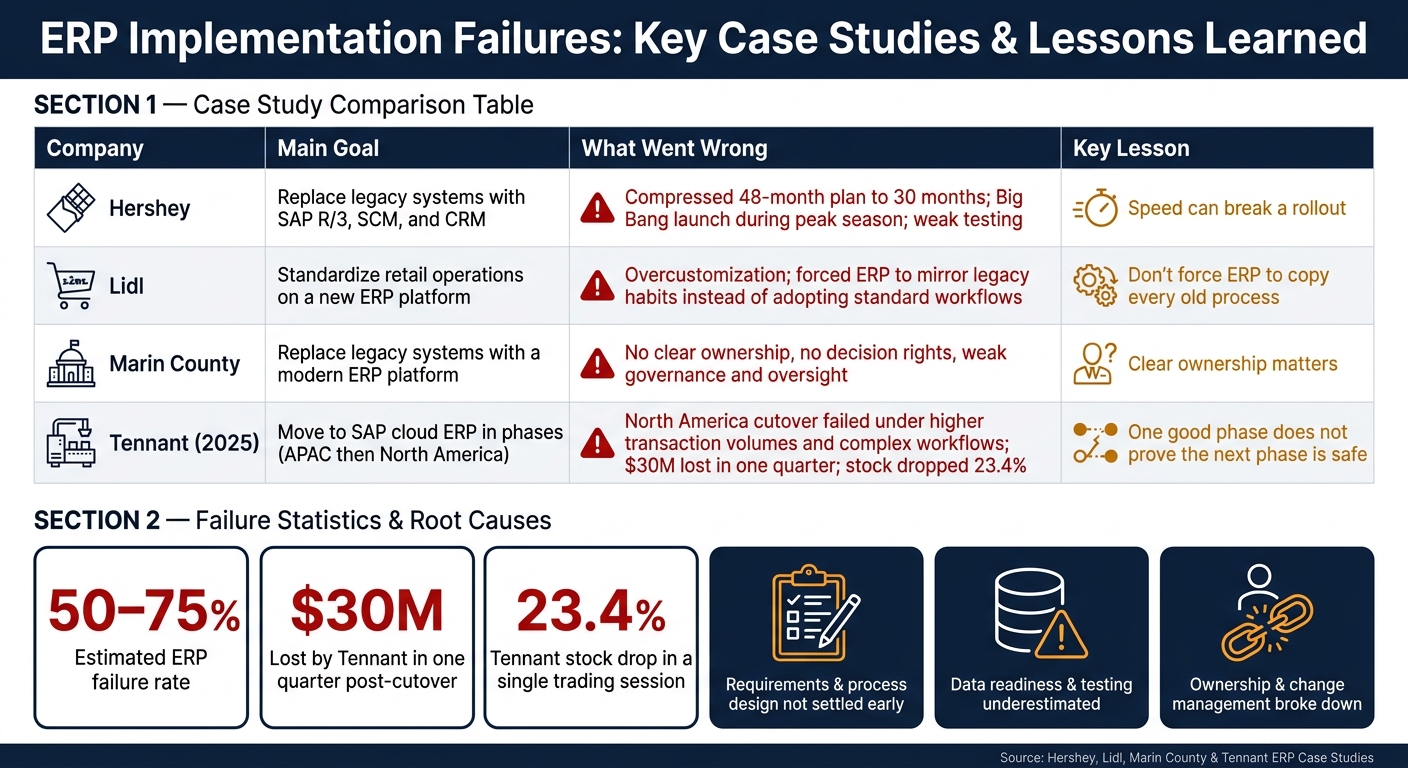
ERP Implementation Failures: Key Case Studies & Common Causes
These ERP cases follow the same script more often than most teams want to admit. In Hershey, Lidl, and Marin County, the trouble shows up in familiar places: compressed timelines, weak testing, bad data, process mismatch, and limited executive ownership. Once you line the cases up side by side, the pattern is hard to miss.
Here’s a quick snapshot of the three cases covered in this article:
| Company | Implementation Goal | Failure Trigger |
|---|---|---|
| Hershey | Replace legacy IT with integrated SAP R/3, SCM, and CRM | Rushed 30-month timeline; go-live during peak season |
| Lidl | Standardize retail operations on a new platform | Overcustomization; mismatch between software and business model |
| Marin County | Replace legacy systems with a modern ERP platform | Complexity, governance breakdown, and recovery risk |
Weak planning, unrealistic timelines, and scope overload
Tight schedules show up again and again in failed ERP rollouts. Hershey is one of the clearest examples. The company tried to shrink a recommended 48-month implementation into 30 months so it could hit the Y2K deadline. That decision gave the team less time to test, train users, and sort out issues before launch. Then the cutover happened during Hershey’s busiest season. That’s about the worst time to find out a system isn’t ready.
The lesson is pretty plain: when leadership locks in a go-live date too early, teams usually pay for it somewhere else. Testing gets squeezed. Training gets delayed. Scope gets cut. And the parts that seem easiest to postpone often turn out to be the parts that matter most.
Process mapping, data migration, and system integration almost always take more time than early plans suggest. If those jobs aren’t done before the launch date is fixed, the project starts running on wishful thinking.
Poor testing, bad data, and process misalignment
Weak testing and messy master data don’t just cause IT problems. They disrupt the day-to-day workflows that keep the business moving, especially order entry, shipping, and customer service. That’s when an ERP issue stops being a project issue and turns into a business issue.
"Testing is your opportunity to identify any known errors within your data, processes, and system integrations. Rushing it could mean allowing minor problems to slip through the cracks, where they grow into bigger problems." - Bill Baumann, Senior Executive, Panorama Consulting
Cloud ERP systems are usually built around standard workflows. That can work well, but only if the business has taken the time to map how it actually operates. If a company tries to force new software onto old processes that were never clearly defined, the system may function as designed while the business still stumbles. On paper, the rollout looks fine. On the ground, people can’t get work done.
Low executive ownership and weak change management
ERP programs tend to go off track when leaders treat them like IT projects instead of business change efforts. Once executives hand the work to a technical team and step back, key calls on process design, go-live readiness, and user adoption often happen too late or at the wrong level.
"The business case for transformation is rarely the problem. The problem is almost always in the governance, testing discipline, and escalation structures." - ElevatIQ
Training gaps make the situation worse. If the people who use the system every day don’t know how to work in it, even a sound setup can fall apart at the point of use. That’s when teams start building workarounds, resisting the new process, or entering poor data just to keep things moving. And once that starts after go-live, fixing it gets a lot harder.
The next three cases show how these patterns played out in actual implementations.
3 ERP implementation failures and what each one shows
These three cases show the same ERP risks in very different settings.
Hershey: rushed go-live and testing gaps
Hershey wanted to replace fragmented legacy systems with SAP R/3, Manugistics SCM, and Siebel CRM to modernize operations and get ready for Y2K. The goal made sense. The rollout did not.
Management squeezed a recommended 48-month implementation into 30 months and went with a Big Bang launch across all three systems at the same time. The breakdown hit order-taking, processing, and distribution. Hershey had product sitting in warehouses but couldn't get it out to retailers.
That’s the heart of the lesson here: deadline pressure can wreck a project when it cuts testing short and shrinks the launch window.
Hershey moved too fast. Lidl had a different problem: the system didn’t fit the way the company wanted to work.
Lidl: overcustomization and platform mismatch
Lidl’s core mistake was overcustomization. It pushed SAP to mirror legacy habits instead of changing processes to fit the system’s standard workflows. So the ERP ended up built around old ways of working, not the platform’s normal design. Once that happens, the project can start slipping all over the place. It becomes harder to control, harder to maintain, and harder to steady.
The more an ERP is bent away from its standard design, the more likely it is to lose reliability and flexibility.
Marin County shows another common failure pattern: weak governance.
Marin County: complexity, governance, and recovery risk
Marin County’s case shows how project complexity and weak governance can derail an ERP rollout. The problem was governance: there was no clear owner, no clear decision rights, and no steady oversight.
Even a good system can stall when no one is clearly in charge.
Root causes behind the failures
These failures usually come back to three root causes. ERP implementation failure rates are estimated at 50% to 75%. In most cases, the problem isn't the software alone. It's the organization around it: unclear requirements, weak data prep, and poor ownership.
Requirements and process design were not settled early
A lot of ERP failures begin long before go-live. Hershey, Lidl, and Marin County all ran into trouble in part because requirements were not locked down before execution. Teams avoid the hard decisions about target workflows, ownership, and how the new system should support day-to-day work. Then they hope the software will sort out those issues later.
It won't.
Many companies commit to software before they define target workflows. Once that happens, the system has to change while design is already in motion. That creates drag fast. Late requirement changes spill into other parts of the project, especially data and testing.
Data readiness and testing were underestimated
Even a well-planned implementation can fall apart on day one if the underlying data is messy. Duplicate, incomplete, or inconsistent data rarely shows up in a polished demo. It shows up when a real order can't be processed or a shipment can't be tracked. That's when the trouble becomes impossible to ignore.
Testing has to do more than show screens work. It has to prove that real orders, shipments, and financial transactions work end to end.
"Go-live is not a finish line. It is a test of whether the business can operate in the new system." - Bill Baumann, Senior Executive, Panorama Consulting
Tennant Company showed how costly that gap can be. In November 2025, the North American cutover failed almost right away. The system couldn't handle the higher transaction volumes and more complex fulfillment workflows in that region. The result was $30 million in lost net sales in a single quarter and a 23.4% stock drop in one trading session.
And even with a workable system, poor sponsorship can still sink the rollout.
Ownership, adoption, and decision-making broke down
Weak executive sponsorship, slow issue escalation, and poor communication between leadership, consultants, and front-line staff can wreck an implementation that might otherwise have worked. When users don't trust the new system, or simply don't understand it, they fall back on spreadsheets and workarounds. The ERP keeps running in the background, but the real work moves somewhere else.
Across all three root causes, the pattern is pretty clear: these problems were knowable and preventable. They weren't shocks. They were decisions pushed off until the project was too far along to fix cleanly. That points to three direct fixes: tighter scope, cleaner data, and stronger governance.
The next step is turning those lessons into implementation choices.
How to reduce ERP failure risk: lessons from the cases
These failures tend to follow the same script: damage that could've been avoided, caused by calls made too late. So the fix starts before go-live, not after.
Use phased rollouts, tighter scope, and realistic timelines
Scope is the first thing to control. The main mistake in these cases was rolling out too much, too fast. Hershey launched ERP, CRM, and SCM at the same time after shrinking a 48-month project into 30 months to hit the Y2K deadline. That's a clear warning sign. Keep the rollout narrow at first, phase it in, and expand only when the team can handle the next step. Go-live should be a readiness check, not just a date circled on a project plan.
Tennant adds another lesson. The company did use phases - APAC first, then North America - but that didn't guarantee the second launch would go well. APAC went live in September 2025, yet North America's cutover broke down under heavier transaction volumes and more difficult integrations that APAC testing didn't surface. In plain English: one good launch doesn't prove the next one is safe. Every phase needs its own go/no-go review.
Budget for data cleanup, testing, and training before launch
After scope and timing are set, readiness comes down to three things: testing, data cleanup, and user training. Those can't be squeezed in at the last minute.
- Test with real transaction volumes, real integrations, and edge cases.
- Clean data before migration, not during a crisis.
- Train users by role, then back them up at go-live.
"If there's any ERP implementation phase that should be preserved to the greatest extent possible, it's systems testing." - Bill Baumann, Senior Executive
Tennant's remediation budget shows what happens when teams don't plan enough room for stabilization. It climbed from $5 million to over $20 million. That's not a minor overrun. It shows why post-go-live support should be funded from the start as part of stabilization, not treated like optional cleanup.
Conclusion: the clearest takeaway from these failures
In each case, the damage came from decisions that were easy to see coming: vague requirements, timelines pushed by pressure instead of readiness, testing cut back to save time, and users expected to adjust without enough help.
Hershey and Tennant point to the same idea. Companies that handle ERP well treat the rollout as a business change project from day one, not just a software install. That means locking requirements early, cleaning data before migration, testing under real conditions, and making sure people know how to use the system before it goes live.
"Investing in technology without investing in people is to risk losing everything." - Emilie Patrier, Head of Customer Revenue at MeltingSpot
That is the lesson.
FAQs
Why do ERP projects fail so often?
ERP projects often go off the rails when companies treat them like IT work instead of a business change effort. That mistake shows up early: poor requirements, weak executive backing, and too little input from the people who’ll use the system every day.
Things also break down when teams underestimate data migration, customize too much, ignore change management, and chase the deadline instead of making sure the business is ready to operate on day one. That’s how you end up with a messy go-live.
How can we tell if an ERP rollout is not ready?
Watch for red flags before go-live: missed deadlines, repeat delays, testing that only covers best-case scenarios, manual workarounds, unverified data, or no clear plan for post-launch support.
It’s also not ready if the design moved ahead without input from the employees who actually do the work. Same goes when the team is more fixated on the launch date than on whether the system works in day-to-day operations.
Should ERP systems be customized or standardized?
It’s a business choice, not an either-or call.
Standardizing processes can cut costs and speed up implementation. But if you push a business into generic templates that don’t match how work actually gets done, you can throw day-to-day operations off track.
Customization makes sense when a process helps you win in the market, protect revenue, or meet compliance needs. But extra customization for its own sake can pile up technical debt and make future upgrades harder.
Related Blog Posts
- Best AI Tools for Real-Time Capacity Planning
- Hidden Costs of Enterprise CRM Solutions
- ERP Integration for Demand Planning: Complete Guide
- Ultimate Guide to SaaS Pilot Testing Risk Management
More on StackRundown
Continue on the SaaS Buyer Guides hub, or read next: