HubSpot vs Zendesk: CRM Ticketing Comparison
Head-to-head look at HubSpot vs Zendesk: CRM visibility versus advanced routing, SLA control, pricing, and scale.

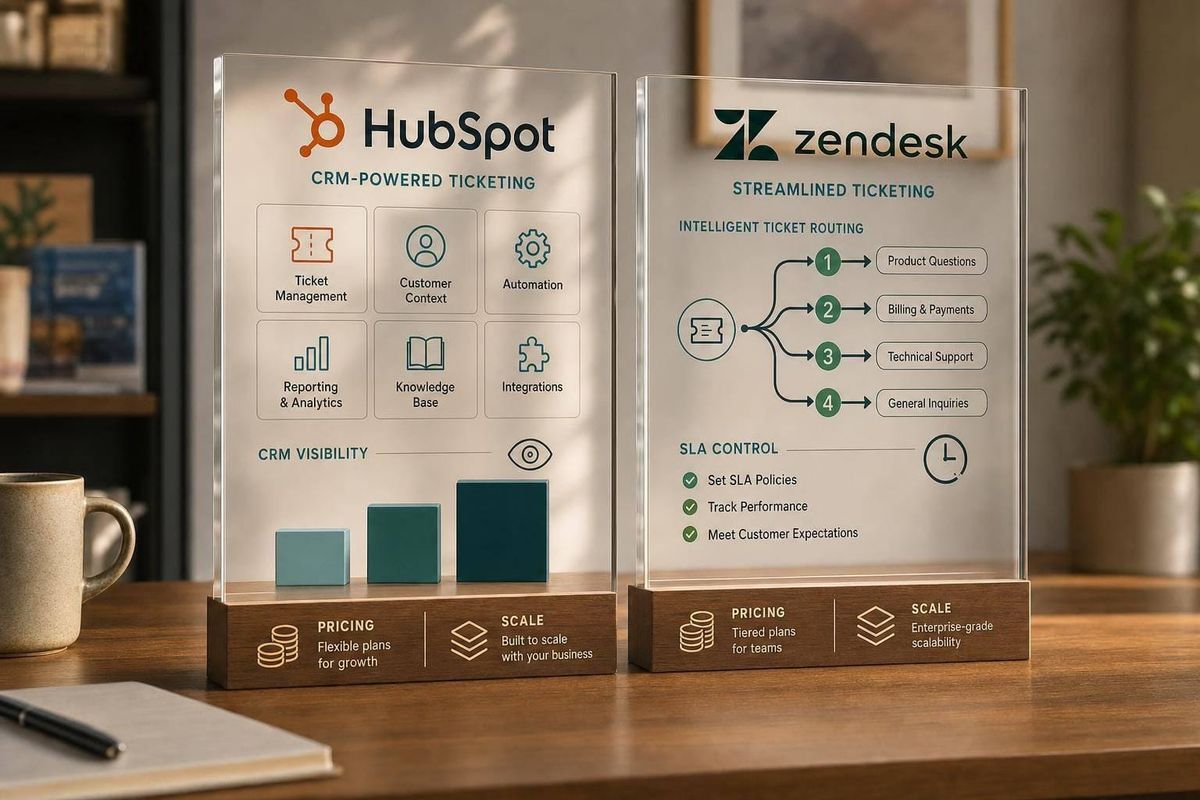
If you want CRM context inside every ticket, I’d pick HubSpot. If you need deeper routing, SLA control, and support scale, I’d pick Zendesk.
Here’s the short version:
- HubSpot fits teams that want support, sales, and marketing data in one place
- Zendesk fits teams that handle more tickets and need tighter queue control
- HubSpot starts free for up to 2 users
- Zendesk Suite starts at $55/agent/month
- HubSpot Professional is about $90/seat/month plus a $1,500 onboarding fee
- Zendesk AI Copilot adds $50/agent/month
What I’d look at first:
- Inbox and channels: both cover email and chat, but Zendesk adds stronger voice and SMS support
- Routing and SLAs: Zendesk goes deeper with skill-based and workload-based routing
- Customer context: HubSpot gives agents sales and marketing data in the same system
- Automation: HubSpot leans on CRM-based workflows; Zendesk leans on support rules and macros
- Reporting: HubSpot ties service data to revenue; Zendesk goes deeper on SLA and CSAT tracking
- Cost at scale: the price gap gets larger at 20 or 50 agents
Bottom line: I see this as a simple tradeoff. HubSpot is the better fit for CRM-led support. Zendesk is the better fit for support-first teams.
Zendesk vs HubSpot: Picking the Proven CX Software
sbb-itb-fd683fe
Quick Comparison
| Criteria | HubSpot Service Hub | Zendesk Suite |
|---|---|---|
| Best fit | Teams that want CRM context in tickets | Teams that need deeper ticket control |
| Main focus | CRM-first | Support-first |
| Customer record view | Native sales, marketing, and service data | More ticket-focused; CRM data often needs a sync |
| Routing | Basic to mid-level | More advanced |
| SLA tools | Professional and Enterprise | Professional and Enterprise |
| AI | Breeze AI summaries and replies | AI Copilot, triage, summaries |
| Starting price | Free for up to 2 users | $55/agent/month |
| Mid-tier price | About $90/seat/month | $115/agent/month |
| Best for | SMBs and B2B teams already on HubSpot | Mid-market and enterprise support teams |
If you’re choosing between them, I’d use one question: Do your agents need the full customer picture, or do they need tighter control over high ticket volume?
HubSpot vs Zendesk at a glance
HubSpot is CRM-first. Zendesk is support-first. In day-to-day work, that changes what an agent sees first: business context or queue control.
HubSpot: built for CRM-centered support teams
HubSpot Service Hub lives in the same platform as HubSpot Sales and Marketing. That means customer data is native, so agents can see sales and marketing context right inside the ticket.
That shared CRM view is a big reason HubSpot fits support teams that work side by side with sales.
Zendesk: built for support-heavy operations
Zendesk shines when routing, SLAs, and queue control matter most. It’s a standalone support platform, so teams often connect it to a CRM when they want deeper sales and marketing context. That can take more setup, but it gives teams tighter control as they grow.
This gap becomes a lot more noticeable when ticket volume climbs and routing rules or SLA tracking start to run the show.
Comparison table: key differences
| HubSpot Service Hub | Zendesk Suite | |
|---|---|---|
| Primary strength | CRM-centered support | Ticketing-first operations |
| Best for | SMBs using HubSpot Sales/Marketing | Support-centric teams and enterprises |
| Workflow depth | Moderate; intuitive pipelines | High; advanced routing and macros |
| CRM context | Native; full sales and marketing view | Requires CRM integration |
| Automation | Visual workflow builder | Advanced routing and macros |
| Reporting | Unified across all Hubs | Deep SLA and CSAT analytics |
The next section looks at how these differences play out in inboxes, workflows, records, automation, and reporting.
Feature comparison: inbox, workflows, records, automation, and reporting
The rest of the comparison comes down to one thing: how the CRM-vs-support split shows up in day-to-day ticket work.
Shared inbox, omnichannel support, and ticket workflows
HubSpot's Conversation Inbox brings email, chat, WhatsApp, form submissions, and Facebook Messenger into one place. Zendesk's Agent Workspace does that too, but it has stronger native support for voice and SMS.
The bigger difference is routing. HubSpot handles basic routing. Zendesk goes further with skill-based, workload-based, and priority-based routing. If your team needs to send the right ticket to the right agent fast, that gap can matter a lot. SLA tools are available in HubSpot Professional and Enterprise, and in Zendesk Professional and Enterprise.
| Feature | HubSpot Service Hub | Zendesk Suite |
|---|---|---|
| Channels | Email, Live Chat, WhatsApp, Form Submissions, Facebook Messenger | Email, Chat, Social Messaging, Voice, SMS |
| Routing Depth | Basic automated routing | Advanced skill-based, workload, and priority routing |
| Workflow Controls | Visual workflow builder (Professional+) | Triggers, Automations, and Macros |
| SLA Support | Professional and Enterprise | Professional and Enterprise |
Customer records, CRM context, and agent workspace
This is where HubSpot has a clear edge for teams that live inside a CRM. Because Service Hub uses the same database as HubSpot Sales and Marketing, agents can see deal history, open opportunities, and past marketing interactions right inside the ticket. No extra integration needed. That kind of context helps most during renewals and escalations, when support issues spill into sales or account management.
Zendesk takes a different path. Its workspace is ticket-centric and built for speed. That works well for support-heavy teams. But if agents need deeper account context, that usually has to come from Zendesk Sell or another CRM. That extra handoff can slow things down when multiple teams are involved.
| Feature | HubSpot Service Hub | Zendesk Suite |
|---|---|---|
| Data Visibility | Native 360-degree view across Sales, Marketing, and Service | Ticket-centric; requires integration for full CRM context |
| Cross-Team Context | High; shared database with Sales and Marketing Hubs | Moderate; relies on Zendesk Sell or external CRM sync |
| Workspace Usability | Intuitive, CRM-style interface; low learning curve | Focused agent desktop; can be complex to configure |
Automation, reporting, and AI tools
HubSpot's visual workflow builder lets teams automate ticket handling using CRM data as triggers. So instead of acting only on support events, it can also react to what's happening in sales or marketing. Zendesk's Triggers and Automations are more support-focused, built for event-based routing and repeat responses at scale.
On the AI side, HubSpot offers Breeze AI for summaries and suggested replies. Zendesk's AI Copilot leans more into triage, routing, and summarization.
| Capability | HubSpot (Lower Tiers) | HubSpot (Higher Tiers) | Zendesk (Lower Tiers) | Zendesk (Higher Tiers) |
|---|---|---|---|---|
| Automation | Simple ticket automation | Advanced workflows & custom objects | Pre-defined business rules | Advanced triggers & skill-routing |
| Reporting | Standard dashboards | Custom reports & attribution | Basic ticket analytics | Advanced SLA & CSAT analytics |
| AI Tools | Basic bots & AI summaries | Breeze AI, Conversation Intelligence | Standard bots & macros | AI Copilot ($50/agent add-on), Intelligent Triage |
Reporting follows the same pattern. HubSpot connects support data back to CRM revenue. Zendesk goes deeper on SLA and CSAT tracking. That difference starts to matter even more when pricing and stack fit come into play.
Pricing, integrations, and total cost for U.S. teams
HubSpot vs Zendesk: CRM & Support Pricing Comparison 2024
Once routing, reporting, and CRM context are clear, price and stack fit usually decide the winner.
Pricing by plan and likely monthly cost
You can see the product focus in the pricing. HubSpot prices around CRM scope, often compared in HubSpot vs Zoho matchups for startups. Zendesk prices around support depth.
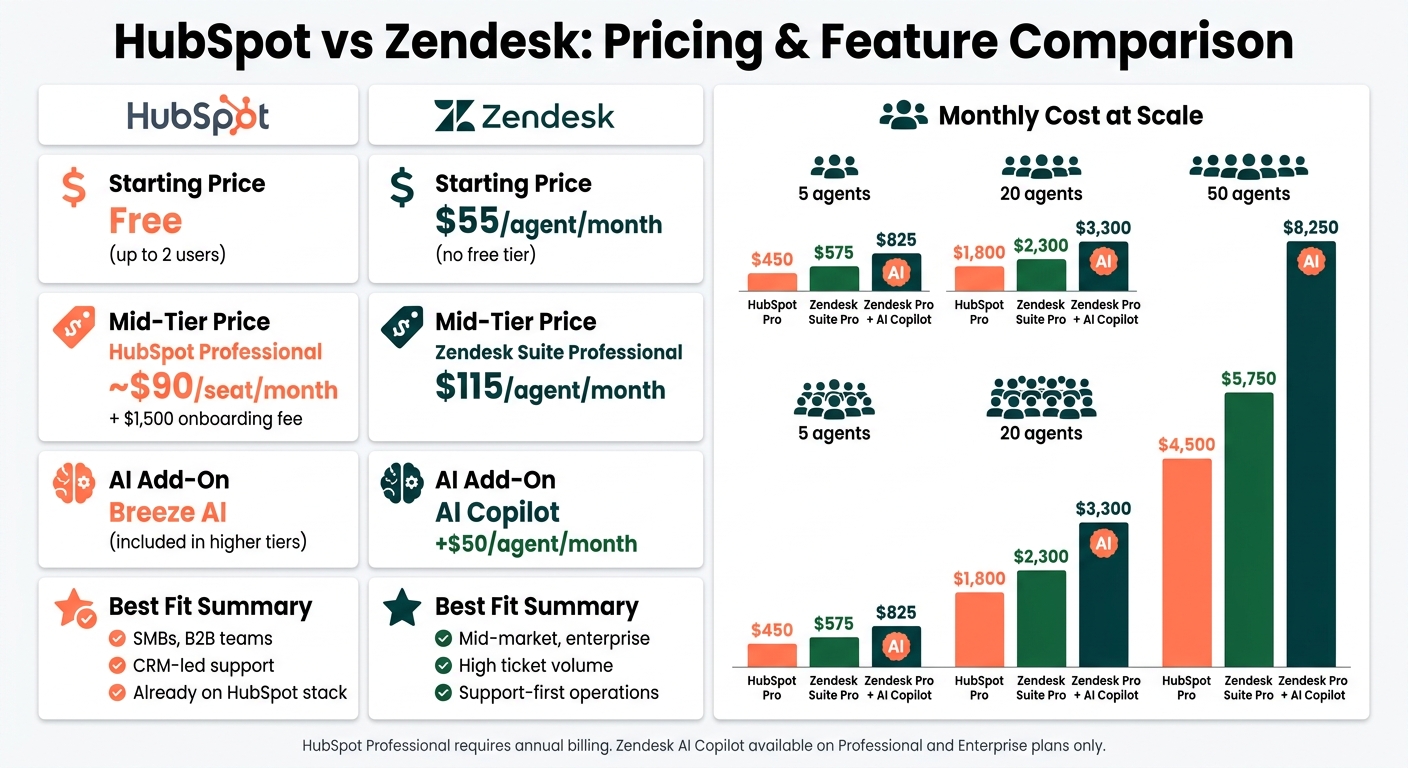
HubSpot is the only option here with a free starting point. Up to 2 users get basic ticketing at no cost. After that, Starter lands at about $15–$20 per seat per month. Professional jumps hard to $90 per seat per month, which is where tools like SLA management become available.
Zendesk does not offer a free tier. Its omnichannel Suite starts at $55 per agent per month, and Suite Professional comes in at $115 per agent per month. If you want AI Copilot, that's an extra $50 per agent per month.
| Team Size | HubSpot Professional | Zendesk Suite Professional | Zendesk Professional + AI Copilot |
|---|---|---|---|
| 5 agents | $450/mo | $575/mo | $825/mo |
| 20 agents | $1,800/mo | $2,300/mo | $3,300/mo |
| 50 agents | $4,500/mo | $5,750/mo | $8,250/mo |
HubSpot Professional requires annual billing and a $1,500 onboarding fee. Zendesk AI Copilot is available only on Professional and Enterprise.
That gap can feel small with 5 agents. At 20 or 50, it starts to hit the budget in a much bigger way.
Integrations and stack fit
On paper, both tools connect with most of the apps U.S. teams already use. HubSpot's App Marketplace lists 1,000+ integrations, while Zendesk's Marketplace lists 1,200+.
The day-to-day difference is less about the raw count and more about how each system fits your setup.
HubSpot works like an all-in-one system. If your sales or marketing team already uses HubSpot, adding Service Hub is usually a smoother move. Support agents can pull up deal history and contact details without much extra setup.
Zendesk takes a different path. It's built to plug into the stack you already have. That can be a good fit if your team uses a mix of tools and wants more control inside the support workspace. But if agents need deep CRM context, you'll often need a separate sync with Salesforce or another CRM. Zendesk also tends to need more setup for CRM syncs and advanced routing, which can mean more admin work. For smaller teams, that may also mean bringing in outside help.
So the tradeoff is pretty simple: HubSpot leans toward built-in CRM context, while Zendesk leans toward deeper support control.
Which team should pick HubSpot or Zendesk
After looking at inboxes, records, automation, and pricing, the choice comes down to one thing: do you care more about CRM visibility or deeper support controls?
Choose HubSpot if CRM visibility matters more than ticketing depth
HubSpot makes sense for teams that want support tickets to live inside the same CRM used by sales and marketing. That setup works well when support is part of the full customer relationship, not just a stand-alone queue. It’s an especially good match for B2B teams with longer sales cycles, where things like renewal dates or contract value can shape how a ticket gets handled.
If your team already uses HubSpot Sales Hub or Marketing Hub, the upside is even clearer. Adding Service Hub keeps customer data in one place, so agents don’t have to bounce between separate tools. Setup is often fast too - in many cases, it takes less than a week.
That gives HubSpot the edge for teams running CRM-led support.
Choose Zendesk if routing, SLAs, and support scale matter more
Zendesk is a better match for support teams dealing with high ticket volume and more complex operations. If you need advanced routing, tighter SLA control, multiple support channels, or agents split into specialized roles, Zendesk is built for that kind of workload.
The catch is simple: it takes more time to set up, and the cost climbs as you grow. Zendesk is a strong fit for mid-market and enterprise teams that are fine with extra complexity in exchange for deeper support control. And if you add AI Copilot, that’s another $50 per agent per month on Professional and Enterprise plans.
Final takeaway
The tradeoff is pretty straightforward: HubSpot wins on CRM visibility. Zendesk wins on routing, SLAs, and scale. Pick HubSpot when agents need the full customer picture. Pick Zendesk when support operations come first.
FAQs
Which one is easier to implement?
It depends on your current tech stack and what your team needs day to day.
HubSpot is often seen as easier to set up. Its interface feels straightforward, and its CRM-first design fits well for teams already working inside the HubSpot ecosystem.
Zendesk is also modern and effective right out of the box, but it can come with a steeper learning curve. Both platforms offer customization, though Zendesk often calls for more setup and staff training.
When is Zendesk worth the higher cost?
Zendesk is worth the higher cost when support quality matters more than all-in-one CRM features.
Choose it if you need enterprise-grade ticketing, complex routing rules, advanced SLA management, deeper integrations, or more granular reporting than HubSpot’s standard Professional plans. It also makes more sense when support is the core of your business or you manage 30+ agents.
Can HubSpot handle complex support teams?
Yes - especially on Professional or Enterprise plans, which include features like SLA management, advanced permissions, and custom objects.
The biggest plus is the unified data model. It gives agents fast access to a customer’s history across marketing, sales, and service, all in one place.
That said, if your team needs very advanced routing rules or deeper, support-specific ticketing workflows, it may not go as far.
Related Blog Posts
- HubSpot vs Zoho: Best CRM for Startups
- 10 Best Sales Pipeline Tools 2026
- Best AI Chatbots for B2B Lead Qualification
- 7 Best Data Visualization Tools for SaaS 2026
More on StackRundown
Continue on the Software Comparisons hub, or read next: