Ultimate Guide to Multi-Currency Invoicing Software
Set up multi-currency invoicing: choose currencies, manage exchange rates, reconcile FX gains/losses, and ensure tax compliance.

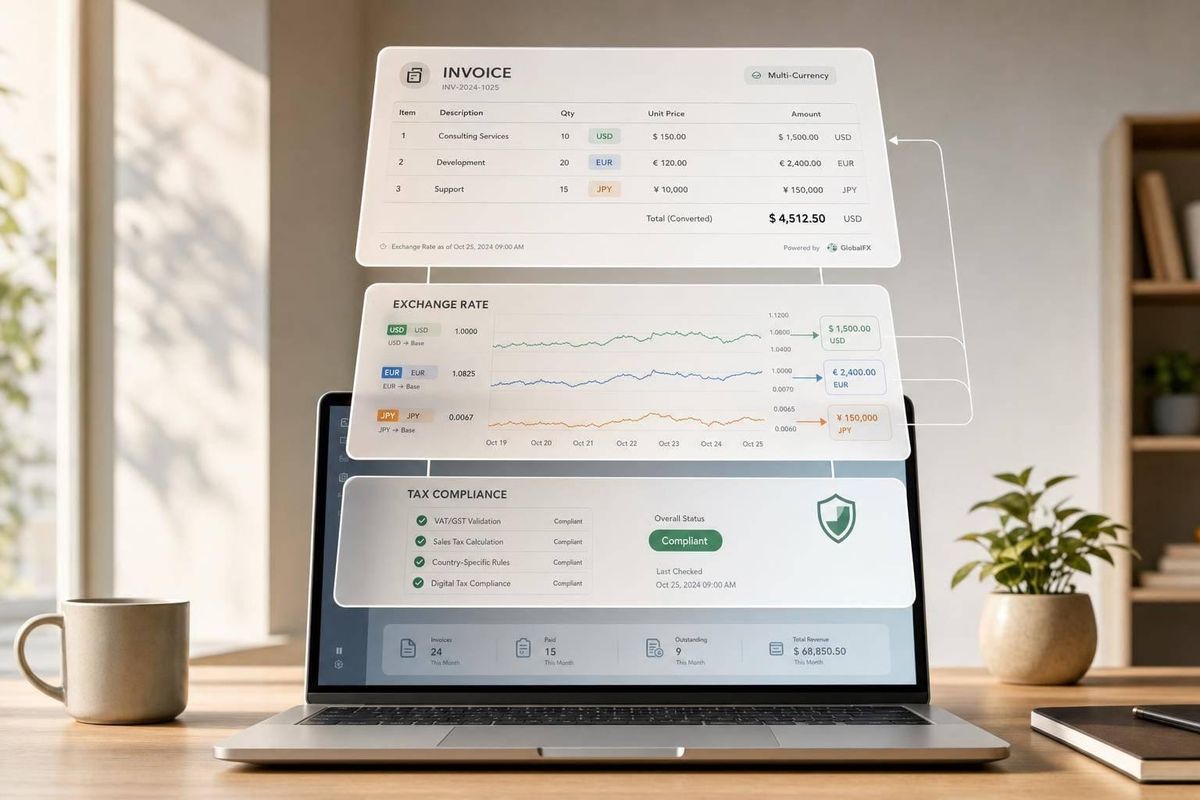
If you bill clients outside the U.S., basic invoicing tools stop working fast. You need software that can bill in foreign currencies, apply the right exchange rate, post payments back to USD, track FX gains and losses, and handle tax rules like VAT, GST, and U.S. sales tax.
Here’s the short version: I’d look for a tool that does four things well from day one:
- Bills in the customer’s currency using ISO codes like USD, EUR, and GBP
- Pulls live exchange rates or lets me lock a contract rate by hand
- Reconciles payments back to USD and records realized/unrealized FX
- Supports tax and invoice rules for cross-border sales, including reverse-charge wording, tax IDs, and local rounding
A few numbers make the case. Bank FX markups often run around 2% to 4%, while some multi-currency payment providers may charge about 0.3% to 0.6%. That gap can eat into margin if I send a lot of overseas invoices.
Before I pick a platform, I’d also test:
- Customer-level currency defaults
- Partial payments at different exchange rates
- FX reporting
- Audit logs for rate source and rate date
- Data export if I ever need to switch tools
Here’s the fastest way to think about it:
| Area | What I’d check first | Why it matters |
|---|---|---|
| Currency setup | Base currency, enabled foreign currencies, customer defaults | Stops billing errors before they start |
| Exchange rates | Auto-updates, locked rates, manual overrides | Keeps invoice values and payment posting in sync |
| Payments | Local collection options, bank fee wording, split-payment support | Helps avoid short payments and manual cleanup |
| Accounting | USD reconciliation, FX gain/loss entries, revaluation | Keeps month-end close clean |
| Compliance | VAT/GST handling, tax IDs, rounding, invoice language | Helps avoid payment delays and tax issues |
If I had to sum it up in one line: the right software should track the full life of an international invoice, not just print a different currency symbol.
Multi-Currency Invoicing | Handle Foreign Currency Transactions | Step-by-Step Guide|Odoo Accounting
sbb-itb-fd683fe
Core Setup Before You Send Your First International Invoice
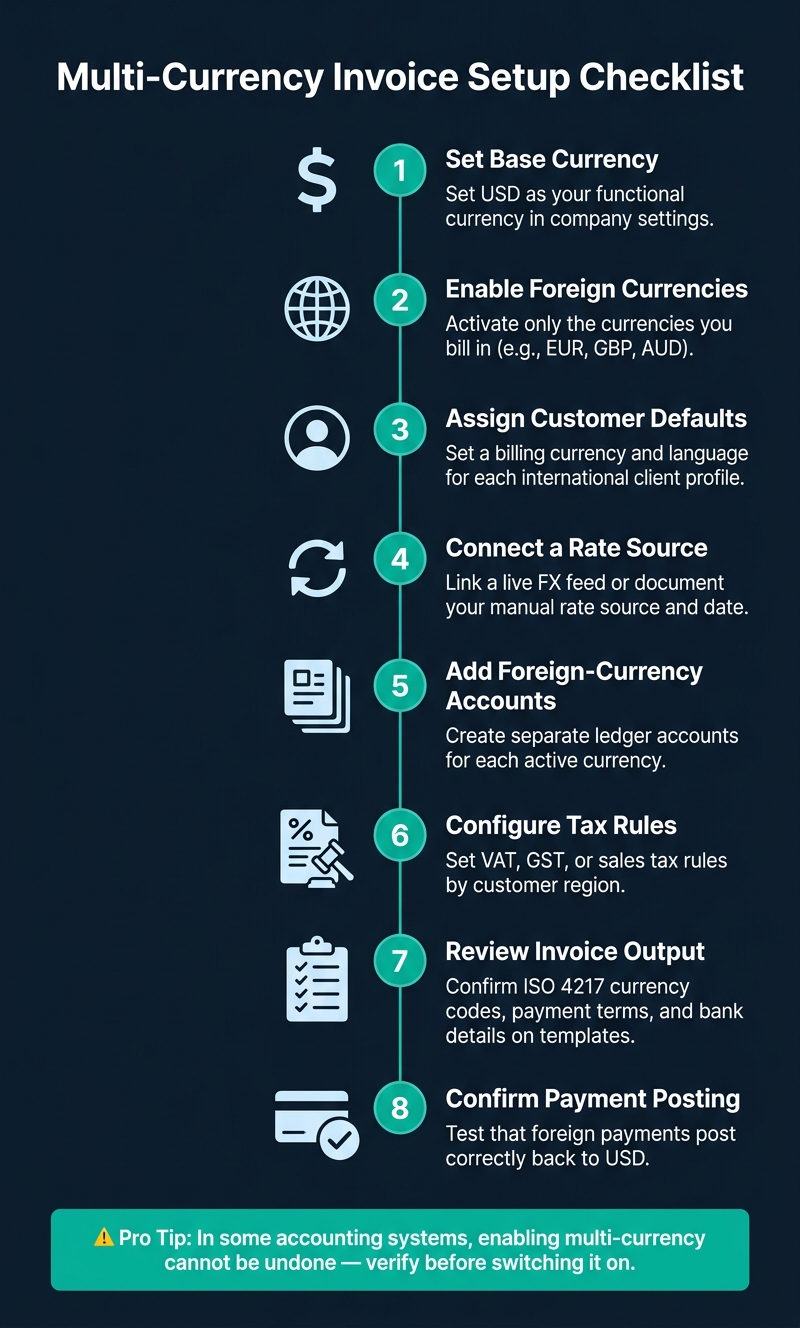
Multi-Currency Invoice Setup: 8-Step Checklist Before Your First International Invoice
Set the currency rules in your software before you send invoice No. 1 overseas.
A little setup now saves a lot of cleanup later.
Currency, Customer, and Invoice Defaults
Start by setting USD as your functional currency in your software's company or localization settings. In some accounting systems, turning on multi-currency can't be undone, so double-check that choice before you switch it on.
Next, enable only the foreign currencies you plan to bill in, like EUR, GBP, or AUD. Then open each international client's profile and assign their preferred billing currency so future invoices fill in the right currency by default.
At the invoice template level, lock in two rules:
- Use ISO 4217 codes like USD, EUR, and GBP instead of symbols like $, which can mean different currencies.
- Use a sequential invoice numbering format such as INV-2026-001. Don't reuse numbers or leave gaps. That keeps your records ready for review and cuts down on posting mistakes.
Exchange-Rate Rules and Manual Overrides
You also need to decide how exchange rates will enter the system: through automatic live rate feeds or manual entry for contract-based rates.
For businesses that send a lot of invoices, live feeds cut admin work and reduce human error. But if you have a long-term B2B contract with a fixed rate written into the agreement, a manual override makes more sense.
When you override a rate by hand, add a short note with the rate source and date. That gives you a clean paper trail for both your auditor and your client. This one setup choice shapes how foreign payments later post back into your USD books.
Step-by-Step Setup Checklist
Work through these steps in order before sending your first international invoice:
| Step | What to Do |
|---|---|
| 1. Set base currency | Set USD as your functional currency. |
| 2. Enable foreign currencies | Enable only the currencies you bill in. |
| 3. Assign customer defaults | Assign a billing currency and language to each client. |
| 4. Connect a rate source | Connect and document your FX source. |
| 5. Add foreign-currency accounts | Add separate accounts for each currency. |
| 6. Configure tax rules | Set tax rules by customer region. |
| 7. Review invoice output | Confirm currency code, payment terms, and bank details. |
| 8. Confirm payment posting | Test foreign-payment posting in USD. |
Next, the software needs to handle tax, localization, and invoice rules cleanly.
Must-Have Features and Compliance Requirements
Features That Matter in Daily Use
Once you’ve set currency defaults and FX rules, the next thing that matters is day-to-day billing. This is where some tools hold up and others start to wobble. What separates them is how they handle rates, payment collection, and reconciliation.
Look for software that updates exchange rates on its own and also lets you override them for contract-priced work. If you bill on fixed-rate contracts, you should be able to lock the rate. And client profiles should carry the billing currency straight into invoices and recurring bills, so you’re not fixing the same field over and over.
Two features have a direct effect on cash flow: local-currency payment collection and reconciliation back to your base currency. If your system connects with a multi-currency account provider like Wise Business or Airwallex, you can give clients local payment details and let them pay through familiar rails. That’s a big deal. Standard bank conversions often add a 2% to 4% exchange rate margin, while specialist providers may charge as little as 0.3% to 0.6%.
The software should also post incoming payments back to your base currency on its own and record realized FX gain or loss. And when you price foreign invoices, it helps to leave a small FX buffer. The point isn’t just to show the right rate on the invoice. The point is to connect rates to the whole transaction lifecycle.
Tax, Localization, and Cross-Border Invoice Rules
After payment handling, the software also needs to produce compliant invoices in each market.
| Taxation System | Common Regions | Key Requirement |
|---|---|---|
| VAT | UK, EU | "Reverse charge" wording required for B2B cross-border sales |
| GST | Australia, Canada, India | Often zero-rated for exported services to foreign businesses |
| Sales Tax | United States | Calculated dynamically by state, county, and local ZIP code |
For B2B sales into VAT or GST jurisdictions, the software should support zero-rating and include a note such as "Reverse charge applies" along with the buyer's tax ID number. For EU transactions, it should also be able to validate VAT identification numbers through the VIES system before you issue a zero-rated invoice.
Tax is only part of the job. The software also needs to handle localization without forcing constant template edits. That includes currency-specific decimal rules, correct rounding by line item or by total depending on the jurisdiction, and invoice language that matches the client’s country. It should also support regional e-invoicing formats and local rounding rules.
Every invoice should include a clear note on wire fees, such as "Remit full invoice amount; sender pays all bank charges." Say plainly who pays bank charges. When you compare tools, these controls aren’t optional.
How to Choose the Right Multi-Currency Invoicing Software
After setup and compliance, the next step is simple: pick software based on how it handles your actual billing work each day.
Selection Criteria for Small Businesses and Startups
Start by matching the tool to the kind of billing you do. A solo consultant doesn’t need the same setup as a startup dealing with FX gains, losses, and consolidated reporting. The right choice comes down to what matters most to you: simple invoicing, payment collection, or reporting across more than one entity.
For smaller teams, focus on the basics first:
- Which currencies the platform supports
- Whether multi-currency is included in your plan
- How easily it syncs with your accounting system
If your needs are more complex, look much closer at reconciliation automation and audit logging. You want software that calculates realized and unrealized FX gains and losses on its own, instead of leaving you to clean things up with manual month-end journal entries. It also helps if the system can post foreign-currency activity to separate FX gain/loss accounts.
One step people skip all the time: run a 30-day trial with real data. Not sample invoices. Real customers, real invoices, real edge cases. Test credit notes, bank feed reconciliation, and data export. That’s usually where the cracks show. It also lets you see how the tool handles partial payments at different exchange rates, which is exactly where many platforms struggle.
At the end of the day, pick the tool that gets invoice creation, payment collection, and recurring billing done with the fewest manual fixes.
Comparison Table: Key Criteria to Evaluate Before You Buy
Use the table below to compare tools based on the features that affect billing accuracy and month-end close. No platform gets every single thing right, so weigh each item against the way your team already works.
| Criteria | What to Look For | Why It Matters |
|---|---|---|
| Supported currencies | Broad currency coverage for your customer base | Gaps in coverage can stop you from billing certain markets |
| Automatic rate updates | Frequent refreshes with manual overrides for fixed-rate contracts | Stale rates create FX exposure between invoice and payment |
| Manual rate overrides | Lock rates for fixed-price contracts | Needed for project-based or retainer billing |
| Tax handling | Tax support for the markets you sell into | Non-compliant invoices can trigger penalties or payment delays |
| Accounting integration | Native sync with Xero or QuickBooks; realized/unrealized gain tracking | Cuts double-entry and manual reconciliation work |
| Reconciliation workflow | Partial payment matching at the rate used for each payment | Helps prevent errors on split or milestone-based invoices |
| Reporting depth | FX gain/loss reports; base-currency consolidation | Needed for an accurate month-end close and tax filings |
| Audit logging | Rate source logged and the date rate was fixed | Tax authorities expect this level of documentation |
| Multi-entity support | Separate books by entity; consolidate at the parent level | Critical for businesses operating across multiple countries |
| Data portability | Export invoice and customer data in common formats | Helps if you need to switch tools later |
Daily Workflows, Reporting, and a Final Implementation Checklist
Common Workflows and Best Practices After Setup
Once your defaults are live, day-to-day work comes down to three things: tight invoicing, steady collections, and a clean month-end close.
Every international invoice should include the ISO 4217 currency code, the exchange rate, and the rate source. If you sell fixed-price work, lock the rate and only change it when your pricing terms allow it. Also spell out who covers wire fees. A simple line such as "Remit full invoice amount; sender pays all bank charges" can help you avoid short payments caused by intermediary bank deductions.
It also helps to automate payment reminders based on the client’s time zone. That small step can make follow-up feel timely instead of random.
That same discipline should show up in your FX tracking and reconciliation.
Reporting, Reconciliation, and Audit-Ready Records
A clean invoice process falls apart if payments and FX are logged differently each time. The rule here is simple: record them the same way, every time.
Track unrealized FX on open receivables and realized FX when cash settles. Use automated month-end revaluation so open invoices are restated at the closing spot rate. Keep logs for both the rate source and the rate date in case of audit review.
Run these reports on a regular basis:
- FX gain/loss
- AR aging by currency
- Currency revaluation
- Base-currency consolidation
Conclusion: The Key Things to Get Right
Before launch, test the full billing cycle with one client from start to finish.
| Category | Action Item |
|---|---|
| Sales/Legal | Confirm contracts specify billing currency, FX rate source, and who pays bank fees |
| Operations | Assign preferred billing currency to each international client profile |
| Technical | Test invoice templates for ISO 4217 currency codes and localized tax formatting |
| Finance | Map "Realized FX Gain/Loss" accounts in your accounting ledger |
| Payments | Verify local receiving accounts or payment links are correct for each currency |
| Compliance | Validate rounding rules (per line vs. total) against local tax authority requirements |
| Reporting | Run a test AR Aging report to confirm it displays correctly in your base currency |
Test one international client end to end, then scale.
FAQs
When should I lock an exchange rate?
Lock the exchange rate when you issue the invoice if the client needs a fixed, predictable amount to pay. That makes their accounting easier and can help the working relationship stay smooth and professional.
This also works well for high-value B2B contracts with longer payment terms, such as Net 30 or Net 60, because it helps protect your margins from currency swings. If you go with a floating rate, apply your FX policy the same way every time for tax and audit purposes.
How do partial payments affect FX gains or losses?
Each partial payment can create a realized foreign exchange gain or loss. That happens when the exchange rate on the invoice date is different from the rate on the payment date.
Here’s the simple version: the invoice amount stays fixed in the customer’s currency, but its value shifts in your functional currency. So every payment needs its own record.
Why does that matter? Because separate payment entries help keep:
- reconciliation accurate
- ledger tracking clean
- tax reporting correct
If you lump partial payments together, the numbers can drift. And when exchange rates move, even small gaps can turn into reporting issues.
What reports should I review each month?
Review reports that convert foreign transactions into your functional currency under statutory rules.
Each month, reconcile bank deposits with invoices. Confirm the amount received and the exchange rate used on the receipt date. Then identify any realized or unrealized foreign exchange gain or loss, and check that your accounting software posted the right ledger amounts in your functional currency.
Related Blog Posts
- 7 Tips for Choosing Invoicing Software
- Best Invoicing Software for Time Tracking Integration
- How to Choose Billing Software for SaaS
- How Late Fee Management Works in Invoicing Software
More on StackRundown
Continue on the SaaS Buyer Guides hub, or read next: