Customization vs Configuration: ERP Flexibility Explained
Prefer ERP configuration first; customize only for critical, differentiating needs to cut cost, upgrade risk, and maintenance.


Most small businesses should configure first and customize only when there’s a clear reason. In many ERP projects, 70%–80% of needs can be handled with built-in settings, while custom code adds more cost, more testing, and more upgrade risk.
Here’s the short version:
- Configuration = using built-in settings, workflows, roles, fields, dashboards, and reports
- Customization = changing system behavior with code, scripts, APIs, or custom modules
- Configuration is usually the first move because it keeps the system closer to standard and cuts support work later
- Customization makes sense when you have a process tied to compliance, revenue rules, pricing logic, or another hard business need
- ERP projects carry risk: about 50% fail on the first try, and usability-driven system changes contribute to cost overruns 65% of the time
- Custom work can be expensive: ERP projects often range from $50,000 to $1,000,000+, and customization may account for 20%–30% of that total
- Annual custom maintenance can run $10,000–$100,000
If I were sizing up an ERP, I’d ask one question first: How far can built-in setup take me before I need code? That answer shapes timeline, support load, upgrade pain, and total cost over the next 3–5 years.
What is the Difference Between ERP Software Configuration vs. Customization? 🛠️💼
sbb-itb-fd683fe
Quick Comparison
| Factor | Configuration | Customization |
|---|---|---|
| How it works | Built-in settings | Code changes or add-ons |
| Time to roll out | Days to weeks | Often months |
| Upfront cost | Lower | Higher |
| Upgrade risk | Lower | Higher |
| Support work | Lower | Higher |
| Best for | Standard business flows | Special business rules |
Bottom line: I’d use configuration for standard finance, inventory, approvals, permissions, templates, and dashboards. I’d save customization for the few cases where the ERP cannot handle a process any other way.
ERP Configuration
In practice, configuration means using the ERP’s built-in tools to fit your core processes without changing code. You stay inside the vendor’s standard setup options, which usually helps keep costs down and makes upgrades less risky. And that setup range is often much broader than buyers first assume.
What Configuration Includes in Practice
Configuration often covers more than many small business owners expect.
On the finance side, that includes setting up your chart of accounts, fiscal year calendar, and posting rules. For U.S. operations, it also means setting sales tax by state, county, and city, mapping product categories to taxability rules, and turning on automatic tax calculation when the ERP supports it. Payment terms such as Net 30 or 2/10 Net 30 are also handled through configuration, along with automated cash discount calculations and aging reports.
It goes well past accounting. Configuration also shapes how work moves across the business. For example, a small U.S. company might set a rule where any purchase order above $5,000 goes to a manager for approval, and anything above $25,000 goes to the CFO before it’s issued. That’s done through the ERP’s built-in workflow designer with statuses, thresholds, and routing rules.
User roles and permissions work the same way. You set up roles like Owner, Controller, AP Clerk, Sales Rep, and Warehouse Clerk, then give each role access only to the screens and actions needed for the job. An AP clerk, for instance, may be able to enter vendor invoices but not approve payments. That separation of duties is a key internal control, and it’s managed through role-based permissions.
The same idea applies to how information looks and how it gets shared. Templates and dashboards are part of configuration too. Invoice layouts, logo placement, payment instructions, and date formats like MM/DD/YYYY are set in template editors, not through development. Role-based dashboards - cash balance and days sales outstanding for the owner, AR aging for collections, inventory turns for the warehouse manager - are built with the ERP’s reporting and dashboard tools, then scheduled to run each day or each week.
Where Configuration Provides Enough Flexibility
For many small U.S. businesses that follow standard industry patterns, configuration is enough to handle accounting, inventory, and reporting.
Standard GAAP processes, such as batching journal entries, closing periods, running trial balances, and generating income statements and balance sheets, are handled through existing parameter settings. Inventory valuation methods like FIFO, LIFO, or average cost are chosen from built-in options and assigned to item groups. Warehouse locations, bin sequences, backorder rules, and partial shipment logic can also be set through the ERP’s standard location and fulfillment settings.
A simple test helps here: if users can finish core tasks in the ERP without relying on spreadsheets or re-keying data by hand, configuration is probably doing the job. Once workarounds start piling up, you’re likely hitting the edge of what configuration can handle. At that point, the next issue is whether customization is worth the tradeoff.
ERP Customization
When built-in settings stop short, customization gives you more room to move. But it does that through code.
Customization changes the ERP with custom modules, scripts, APIs, or integrations. Unlike configuration, it doesn't just adjust settings. It changes how the system behaves. That's the tradeoff: more flexibility, but more weight to carry later, especially if you still want smooth upgrades.
What Counts as True Customization
Customization starts when settings won't get the job done and code has to step in.
A common example is a custom customer or partner portal that pulls ERP data like orders, invoices, and inventory into a branded self-service experience through APIs. Distributors use this setup a lot because it lets them give customers a polished front end without forcing them into the ERP itself.
Another case is changing core module behavior. Maybe a company needs manufacturing orders costed in a special way, or revenue recognized through logic that the standard finance or production modules don't support. Once you extend those routines, you're in customization territory.
The same goes for new data records the ERP doesn't support out of the box. If a business needs something like a project milestone or service package for reporting and workflows, that usually means custom work. And if a niche tool doesn't come with a standard connector, the link to the ERP may need a custom API or middleware layer.
What Small Teams Often Underestimate
Small teams often treat customization like a quick tweak. In practice, it rarely is.
Each customization needs design, development, testing, and user acceptance before it goes live. That can add weeks or months to an implementation timeline, and many teams already plan those timelines too tightly.
Cost is another blind spot. ERP implementations in the U.S. often run from $50,000 to more than $1,000,000, and customization often makes up 20% to 30% of the total project budget. That can mean $10,000 to $300,000 in added services, depending on scope. And that doesn't include ongoing maintenance, which tends to grow as custom code piles up. That's the price of flexibility when configuration no longer covers what the business needs.
The upgrade issue is what trips teams up most often. Every upgrade means retesting custom code. If a customization depends on a deprecated API or a changed data structure, it may need to be rebuilt. Some organizations have even put off upgrades for years because they worried newer vendor versions would break their custom code. The result? They missed security patches and new features.
Custom code also creates key-person risk. If the developer or implementation partner who built it leaves, the team may be stuck with code nobody fully understands. That's why documentation matters. Write down what each customization does, why it exists, how it works, and who owns it. Those tradeoffs become easier to judge in a side-by-side comparison.
Configuration vs. Customization: A Side-by-Side Comparison
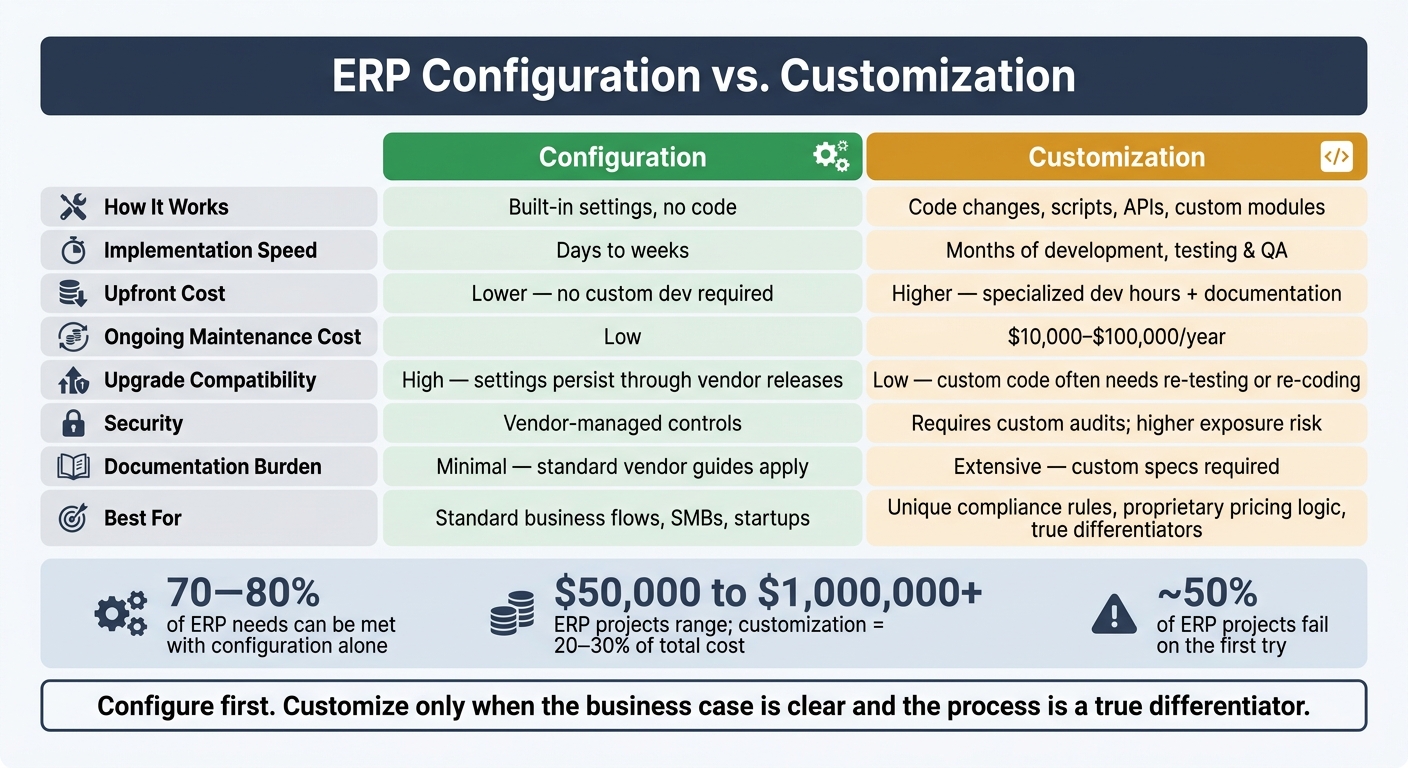
ERP Configuration vs Customization: Cost, Speed & Risk Compared
Here’s where the tradeoff gets concrete: configuration keeps the ERP system standard, while customization changes the system itself.
That difference matters more than it may seem at first. Configuration helps preserve standardization and keeps overhead down. Customization can match your process more closely, but you pay for that fit with more time, more money, and more upkeep.
Configuration is usually faster to roll out and less expensive to maintain. Cloud ERP projects that lean mostly on configuration can go live in about 60–120 days for small to mid-sized businesses. Once customization enters the picture, timelines tend to stretch out. Development, testing, and QA add months, not days.
The cost gap also builds over time. Organizations often spend $10,000–$100,000 per year to maintain customizations, including fixes, refactoring for upgrades, and documentation updates.
Another big split shows up during upgrades. Configuration usually survives vendor updates with little trouble. Custom code is a different story. Each major release may mean re-testing, reworking logic, or both.
And there’s another layer: custom integrations bring more testing work and more governance risk. What looks like a one-time tweak can turn into a long-term burden.
The table below shows where each option helps and where it starts to slow things down.
| Factor | Configuration | Customization |
|---|---|---|
| Code impact | None - uses built-in settings | Modifies or extends core ERP code |
| Implementation speed | Fast - days to weeks | Slow - months of development, testing, and QA |
| Upfront cost | Lower - no custom development required | Higher - specialized dev hours, testing, documentation |
| Ongoing maintenance | Low - vendor handles updates and support | High - internal team owns code upkeep |
| Upgrade compatibility | High - settings persist through vendor releases | Low - custom code often needs re-testing or re-coding |
| Security | Vendor-managed controls | Requires custom audits; higher exposure risk |
| Integration complexity | Standard connectors and APIs; lower testing scope | Bespoke interfaces increase testing burden at every change |
| Documentation burden | Minimal - standard vendor guides apply | Extensive - custom specs required to avoid knowledge gaps |
| Fit over time | Flexible within standard settings | Deep fit for unique processes, but technical debt grows |
Flexibility vs. Standardization: How to Pick the Right Approach
Use the comparison above as a simple filter: configure first, customize only when the business case is clear.
When Configuration Is the Better Choice
For most teams, configuration should be the starting point. If your company uses fairly standard sales, purchasing, and accounting flows, the ERP can often handle the job well enough right out of the box.
This tends to fit startups, SMBs, and teams that are still shaping their processes. Configuration gives you room to adjust as the business changes, and it usually makes upgrades less messy.
Cost matters too. Configuration-only projects are faster to roll out and cost less to maintain over time. If you need to go live on a tight timeline - for example, to close the books for investors or support a funding round - configuration usually gets you there sooner.
Once configuration no longer fits, customization should be the exception, not the first move.
When Customization Is Justified
Customization makes sense only when a process is genuinely different, tied to a clear compliance or competitive need, and can't be handled through configuration, standard modules, or vendor-supported connectors.
A proprietary pricing algorithm or a complex revenue recognition model for multi-element arrangements are good examples of cases where custom code may make sense. The main test is simple: is this process a true differentiator, or is it just how your team prefers to work? Only the first one earns the extra effort.
Set a few guardrails before any custom work begins:
- Assign a named owner
- Write down the business case
- Create an upgrade test plan
Without those checks, a small fix can slowly turn into a long-term maintenance problem.
Final Takeaway
The choice isn't about picking flexibility over standardization. It's about deciding where standard ways of working should stay in place and where exceptions belong. The best ERP teams standardize common work and customize only true differentiators.
FAQs
How do I know when configuration is no longer enough?
Configuration stops being enough when routine updates or simple changes start to feel like major engineering work. If a new business need, like a pricing tier or an internal process, calls for custom code instead of a standard setting, you’ve probably hit a bottleneck.
Growth can trigger the same problem. Once you’re dealing with international operations, higher transaction volume, or multi-entity structures, manual work tends to get messy fast and cost more than it should.
What customizations are worth the risk?
Customizations are worth the risk when they solve specific, high-value business needs that standard setup simply can’t cover.
Smaller changes, like basic fields or forms, are usually easier to manage. Even so, they can push base costs up by 20% to 30%. On the other end, advanced custom coding or proprietary logic brings the most risk and can triple your budget.
That’s why this kind of work makes the most sense for critical operations where native features fall short.
How can I reduce upgrade issues with custom ERP code?
Prioritize native configurations over custom development whenever you can. That simple choice can cut upgrade headaches, trim project costs by 20% to 40%, and help you avoid the technical debt that tends to pile up with complex code.
When customization is necessary, keep it well-documented and modular. It also helps to separate core system functionality from custom logic, so updates and migrations are easier to handle.
Related Blog Posts
- Hidden Costs of Enterprise CRM Solutions
- Best Practices for Dashboard Integration Design
- ERP Integration for Demand Planning: Complete Guide
- ERP Implementation Failures: Lessons From Case Studies
More on StackRundown
Continue on the SaaS Buyer Guides hub, or read next: